cakephpでブックマークアプリを作る (8)-1
間が開いてしまい、すみません。あと、最終回の予定だったんですが、意外と長くなりそうなので、何回かに分けていきます。もうしらばくお付き合い下さい。
ここまで作った内容は
・一般ユーザーが閲覧するCakephp
・マスター管理のプログラム
2つの構成になっています。
では、ここまでの内容をごっそりアップしていきたいと思います。
まずは一般ユーザーが閲覧するcakeをアップ
まず、閲覧用のCakephpをごっそりサーバーの閲覧可能ディレクトリへアップしてあげます。
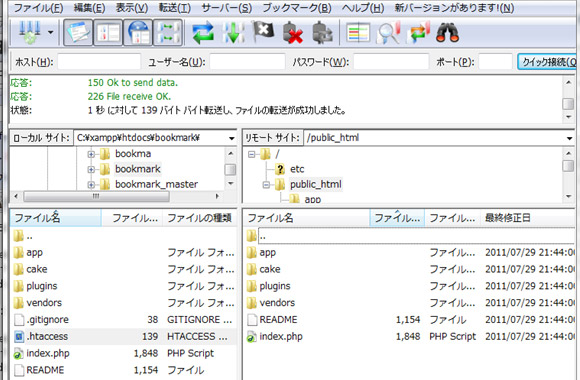
そして、URLでアクセス。
Cakephpエラーとの格闘
サーバーにCakephpアップロード直後のエラー全文です。
Warning (512): /home/it-wonder.info/public_html/app/tmp/cache/ is not writable [CORE/cake/libs/cache/file.php, line 267]

Warning: date() [http://php.net/function.date]: It is not safe to rely on the system's timezone settings. You are *required* to use the date.timezone setting or the date_default_timezone_set() function. In case you used any of those methods and you are still getting this warning, you most likely misspelled the timezone identifier. We selected 'Asia/Tokyo' for 'JST/9.0/no DST' instead in /home/it-wonder.info/public_html/cake/libs/log/file_log.php on line 71

Warning (2): strtotime() [http://php.net/function.strtotime]: It is not safe to rely on the system's timezone settings. You are *required* to use the date.timezone setting or the date_default_timezone_set() function. In case you used any of those methods and you are still getting this warning, you most likely misspelled the timezone identifier. We selected 'Asia/Tokyo' for 'JST/9.0/no DST' instead [CORE/cake/libs/cache.php, line 570]
Warning: date() [http://php.net/function.date]: It is not safe to rely on the system's timezone settings. You are *required* to use the date.timezone setting or the date_default_timezone_set() function. In case you used any of those methods and you are still getting this warning, you most likely misspelled the timezone identifier. We selected 'Asia/Tokyo' for 'JST/9.0/no DST' instead in /home/it-wonder.info/public_html/cake/libs/log/file_log.php on line 71

Warning (512): /home/it-wonder.info/public_html/app/tmp/cache/persistent/ is not writable [CORE/cake/libs/cache/file.php, line 267]
Warning: date() [http://php.net/function.date]: It is not safe to rely on the system's timezone settings. You are *required* to use the date.timezone setting or the date_default_timezone_set() function. In case you used any of those methods and you are still getting this warning, you most likely misspelled the timezone identifier. We selected 'Asia/Tokyo' for 'JST/9.0/no DST' instead in /home/it-wonder.info/public_html/cake/libs/log/file_log.php on line 71

Warning (512): /home/it-wonder.info/public_html/app/tmp/cache/models/ is not writable [CORE/cake/libs/cache/file.php, line 267]
大量のエラーにびっくりするかもしれませんが、ローカル環境(Win)でプログラムを作っていたのならよくあること。ほとんどがファイルのパーミッションの問題だったりします。
PHP 5.3ならこんなエラーが出る
私は自分で構築したVPSサーバーがPHP5.3.3使っているんですが
Warning: date() [http://php.net/function.date]: It is not safe to rely on the system's timezone settings. You are *required* to use the date.timezone setting or the date_default_timezone_set() function. In case you used any of those methods and you are still getting this warning, you most likely misspelled the timezone identifier. We selected 'Asia/Tokyo' for 'JST/9.0/no DST' instead in /home/it-wonder.info/public_html/cake/libs/log/file_log.php on line 71
要約しますと、タイムゾーンをちゃんと設定しやがれってことですね。php.iniに設定してもいいのですが、Cakephpからでもいけます。
app\config\core.phpの変更
core.phpの247行目付近に、
という記述がありますので、コメントアウトを外して、
date_default_timezone_set('Asia/Tokyo');
と、修正して、core.phpをアップしてあげます。
ちなみにこのエラーはPHP5.3以上の環境で、date関数を実行するとこのエラーは見られます。
Cakephpの問題ってよりは、phpの設定の問題ですね。
エラーが激減する
Warning (512): /home/it-wonder.info/public_html/app/tmp/cache/ is not writable [CORE/cake/libs/cache/file.php, line 267]

Warning (512): /home/it-wonder.info/public_html/app/tmp/cache/persistent/ is not writable [CORE/cake/libs/cache/file.php, line 267]

Warning (512): /home/it-wonder.info/public_html/app/tmp/cache/models/ is not writable [CORE/cake/libs/cache/file.php, line 267]
残りのエラーに関しては、ちょっとPHPをかじった人なら分かりますよね。後怒られているのはパーミッションの部分だけです。
FFFTPなどで、パーミッションをそれぞれ変更する
/app/tmp/cache
/app/tmp/cache/persistent
/app/tmp/cache/models/
この3つのディレクトリをそれぞれパーミッションを777としてください。
/app/tmp/cache/persistent/cake_core_default_ja
こちらのファイルのパーミッションを666としてください
こんな人はいませんか?
エラーは消えたんだけど、CakephpデフォルトのCSSが動いていない
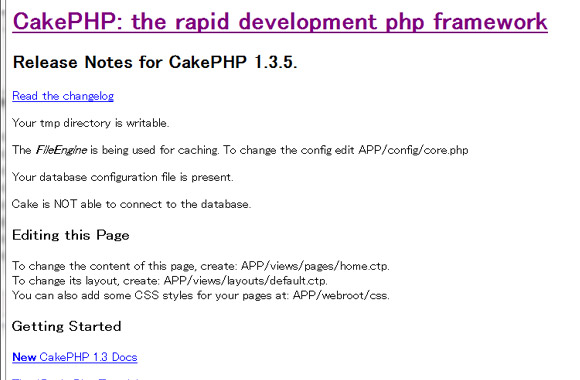
こういう見た目になってしまった人はいませんか??明らかに見た目が悪い・・・というか、Cakephpのデフォルトの黄色と緑のCSSが当たっていない。
/app/webroot/css
に、cake.generic.cssがあるのに、この見た目の人は、/appの直下に
.htaccessがきちんと置かれていないためです。あるいはサーバーに.htaccessの許可がされていないとか。(すんません、私がそうでした)
全てのエラーの対応が終わると、必ずあの緑と黄色のこの見た目になってくれますよ。
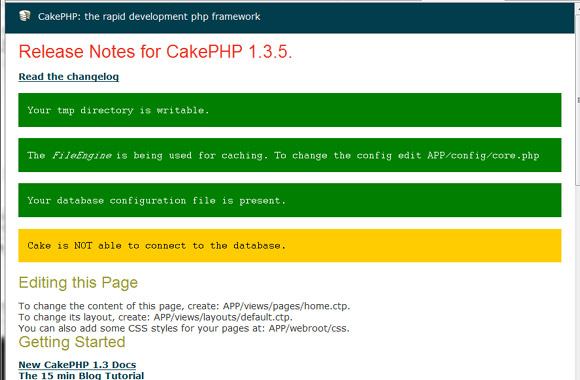
この見た目になったら、アップロードは完了です。
データベースをサーバーにもdumpファイル実行して、同じデータベースを容易してあげましょうね。
一通り上がったところで、設定したデータベースのコピー(dump)を実行します。
phpmyadminなどから、ローカル環境のデータベースをエクスポートして、WEBサーバー上にあるphpmyadminにインポートを行います。
きちんとデータベースに接続できると、
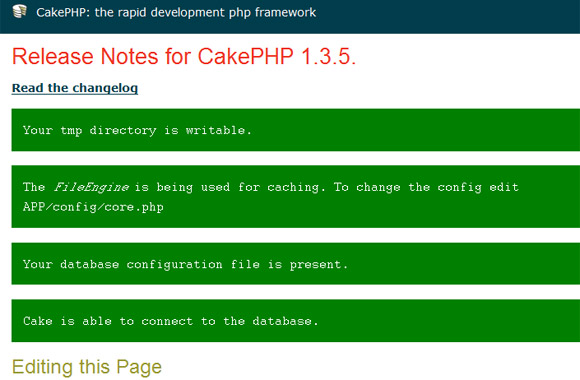
ここまで出来れば準備OKですね。
PHP 連想配列に追加あれこれ
PHPのフレームワークを使っていると、理想の形に配列を変形したくなることがちょいちょいある。
連想配列を 単純な配列に。
$test = array();
foreach($shop_area as $value ){

array_push($test, $value['ShopArea']['area_id']);

}
こうすることで、単純配列に。
連想配列を、単純な配列にすることはよくあって、
連想配列だと 配列の中身をうまく検索できないのだ。
ちなみに$test = array();はけっこう大事。array_pushはあらかじめ配列になっているところにデータを追加する関数だから、
空でよいのであらかじめ配列を代入しておく必要があります。
連想配列に追加してみる
$today の中身はすでに連想配列が入っていると過程して、全ての$today[‘user’]のループ中に[‘dir’]といkeyを追加したい場合はこんなカンジ。
foreach($today as $val =>$taday){

$today[$val]['user']['dir'] = "test";

}
ちなみに、
foreach($today as $val ){

$today['user']['dir'] = "test";

}
こうすると、連想配列のループが壊れてしまいます。どうも、ループの最終データにだけ入って終わります。
いや、こんなことで30分も悩んだのであっしも修行が足りない。
配列を自在に操作できるようになってくると、『PHP極めた』感が出てくるね。
Jquery アンカー(ハッシュ)で処理を分ける
久しぶりにJqueryさんのご紹介。
(と、いうより単なるJavascript的なお話なんですが。)
http://example.com/#test
こんなカンジでアンカーが合った場合ちょっと便利でにくいあいつが
このlocation.hashを使うと、アンカー(ハッシュ)がURL中にあっただけで簡単に処理を分けることができます。
<script type="text/javascript">
$(document).ready(function(){
if(location.hash=="#test"){
$("div.hidden").removeClass("hidden");
}});
</script>
簡単便利なので、これからもちょくちょくこのlocation.hashは使いたいと思います!